Loading...
Loading...
Loading...
Loading...
Loading...
Loading...
Loading...
Loading...
Loading...
Loading...
Loading...
Loading...
Loading...
Loading...
Loading...
Loading...
Loading...
Loading...
Loading...
Loading...
Loading...
Loading...
Loading...
Loading...
Loading...
Loading...
Loading...
Loading...
Loading...
Loading...
Loading...
Loading...
Loading...
Loading...
Loading...
Loading...
Simple is the fast, free app for clinicians to manage their patients with high blood pressure and diabetes. More details at Simple.org
This is a truly free, open source project. Simple has two main components: a mobile app for Android and a secure web-based Dashboard.
The Simple Android app that is used by healthcare workers to:
Enroll patients in a hypertension and diabetes control program
Record patients' BPs, blood sugars, and current medicines
Set future appointments for patients
Contact overdue patients to return them to care
Track an individual facility's performance at controlling patients' BPs
Github:
The Android app is primarily written in Kotlin
A web-based tool that allows managers to:
Track facility, district, and state-level performance in real-time reports
Manage users, facilities, and more
Overdue patient line lists
Deduplicate patients
Automatically send text messages to patients to return them to care
API to manage data across mobile devices and to integrate with DHIS2 and other applications
Github: simpledotorg/simple-server repository
👩💻 The dashboard is primarily written in Ruby on Rails and PostgreSQL
We try to stick to these conventions as much as possible. Think of them as strong guidelines!
Since we using trunk based development as our workflow, we try to merge code daily and not have any long running "feature branches".
Daily branches have the developer's initials, the date, and a small title. For e.g.: Asha Kumari making a branch on 12th April to work on "updated search algorithm", should name the branch something like ak/12apr/update-search-algo. This gently nudges the developer to merge the branch in a day or two, since this is just a convention and not enforced in any manner.
Release branches are automatically cut when we create a new release from Tramline, new branch will be named r/release followed by the date on which the release is triggered. For example, the release branch cut on 10th December 2018 will be named r/release/2018-12-10 .
Why did we develop Simple? How can a data system benefit a hypertension control program?
Hypertension is the leading preventable cause of premature death worldwide, accounting for 10.7 million deaths per year, with most deaths occurring in low- and middle-income countries.
Large-scale hypertension control programs in low-resource settings face many challenges, including understaffed health systems with overworked staff often too busy to document detailed clinical data during patient encounters.
A strong public health program backed by a well-designed digital health information system has immense potential to save lives. An effective digital system must accommodate healthcare worker time constraints so the program can focus on providing high-quality clinical care.
A practical digital system is most likely to succeed if it: 1) is very fast and easy to use, 2) includes only a few key indicators, 3) requires minimal data entry, and 4) is designed with offline-first capability.
The best system is ultimately one that helps the most patients reduce their blood pressure.
Hypertension kills more people than all infectious diseases combined. Hypertension is also very common, affecting 20-35% of adults in most communities. That means that about 1/5 of adult patients in a hospital's outpatient department will present with hypertension. Practically, this means that enormous numbers of patients require counseling, measurement, and treatment — and those patients need to be monitored over time to ensure that their hypertension is controlled successfully.
As you can imagine, this volume of patient management is challenging in busy hospitals in places like India, Bangladesh, Sri Lanka, and Ethiopia.
17.9 million people die each year - from cardiovascular diseases (CVDs), an estimated 31% of all deaths worldwide
Out of 17 million premature deaths (under the age of 70) due to non-communicable diseases in 2015, 82% are in low and middle-income countries, and 37% are caused by CVDs.
75% of CVD deaths occur in low and middle-income countries.
A system for monitoring is one of the core pillars of a hypertension control program based on the World Health Organization's . By recording a high volume of follow-up visits by patients with hypertension, it's possible improve the health system more quickly. Fundamentally, Simple is a system of feedback loops to improve patient treatment and strengthen health systems.
Just with minimal information about each patient's current BP measures, medications, a health system or hospital can monitor:
In the graphs above, an epidemiologist or health official can read a story. BP control rates in region are increasing over the last 3 months, great! This is a result of declining "Missed visit" rates (blue chart) and also that more patients who come back have their BP controlled now (red chart). If we want to continue to increase BP control, we could focus on returning even more patients to care or we could try to reduce the red number further (e.g. by counseling patients on medication adherence, by ensuring medical officers are treating to protocol, or by sending patients home with longer prescriptions). This region has a good BP control rate (above 50% is good!), so maybe we would focus on identifying more people in the community with hypertension and start treating them — 35,525 might only represent 5% of the local population with hypertension.
Other indicators are also tracked. For instance:
Lost to follow-up patients: How many patients have not visited in over 1 year?
Calls made to patients: How many calls have healthcare workers made to patients?
Medication titration rates: How often are medical officers intensifying treatment for patients with uncontrolled blood pressure?
See our section for a detailed list of indicators and definitions.
Patients want to know whether treatment is succeeding. Clinicians strive for better management of each patient. Health system managers and public health officers are concerned with system performance and entire populations, often millions of people.
The core challenge, therefore, is to design software that meets the needs of all three of these groups while operating within severe time constraints at the point of care.
Simple is designed to be a pragmatic tool. A typical clinical visit in India lasts 3-4 minutes. In Bangladesh it's closer to 2 minutes. A busy clinician is juggling many tasks in this tight time: taking blood pressure and blood sugar measures, diagnosising, prescribing, and counseling the patient.
Keep in mind that clinicians don't come to work to do data entry. They focus on treating patients.
If we expect thousands of overworked healthcare workers to enter a high volume of data for a large percentage of their patients, we need to make fast and easy.
A digital health information system that minimizes and streamlines data entry allows healthcare workers to concentrate their limited time on providing direct patient care. Registration of new patients requires entry of patient information, demographic data, and health history, which needs to be done only during initial intake. A well-designed digital system can accomplish patient registration and first clinical visit in approximately 80 seconds (exclusive of physical blood pressure measurement): scan ID card to determine whether the patient is already registered and if not decide whether to enroll as a new patient (6 seconds); verify or enter patient information and demographics and conduct brief survey of cardiovascular history and risk, including current medications (66 seconds); enter blood pressure readings (6 seconds); and schedule follow-up visit (2 seconds).
After initial registration, healthcare workers need only scan the patient ID card and verify identity, enter blood pressure readings, verify current medications, and schedule follow-up, all of which can be done reliably within about 15 seconds. Variables required for patient registration must also be kept to an absolute minimum or many patients will go unregistered and their data unrecorded. There are many important variables of interest to epidemiologists and program managers. By evaluating these additional variables in specially designed studies on specific groups rather than for every patient, more reliable data will be collected and, most importantly, front-line health workers’ time to interact with patients will be respected and protected.
Designing with the pretense that healthcare workers have more time than they do results in software that is never adopted, is used inconsistently, or collects inaccurate data. Usability by front-line staff should be prioritized over any other consideration.
A tool that is fast to use can also be fast to train; minimizing data entry minimizes what healthcare workers need to learn. Train users in situ at hospitals and clinics, ideally in less than 1 hour, to reduce overhead costs for conducting trainings and to enable implementation scale.
Staff turnover and task sharing are common. If the digital tool is easy to learn, trained staff can teach others.
Based on metadata from more than 1.8 million patients, the Simple mobile app is widely used and performance remains very fast (approximately 80 seconds for registration and entering data from the initial clinical visit and 15 seconds to enter follow-up visit data). Data dashboards are easy to produce and disseminate and widely used by program staff. In Bangladesh, hypertension control rates more than doubled within a few months, from approximately 20% to 45%, in clinics that adopted the Simple app, although other program improvements likely also contributed to this increase.
In qualitative interviews, healthcare workers consistently rate the Simple app highly and emphasize how it reduces their burden of work and helps them to efficiently manage patients, monitor progress to improve blood pressure control, and deliver better care to patients
See an example hypertension treatment protocol from Punjab, India
See "How to take a BP: BP Measurement checklist" to learn to take a BP
Please feel free to reach out if you would like to contribute to Simple or if you're interested in using Simple in your area.
Most discussion happens on Slack — just ask [email protected] and we'll add you to the team Slack, which is at https://simpledotorg.slack.com/
General information
Daniel Burka, Director of Product and Design
The main features of the Simple Android app, created for healthcare workers to record patient visits. The app is optimized to record a very high volume of patient follow-up visits.
In many countries, patient visits are very short. In India, a typical visit with a clinician is about 3-4 minutes, in Bangladesh it's closer to 2 minutes. That's only a few minutes for an entire clinical encounter. When we ask clinicans how we can help them, the almost universal answer is: "Don't make my life harder." We take the responsibility of protecting clincians' precious time very seriously. One of core tenets of Simple is that it can be fast... really fast. The median time to record a hypertension or diabetes follow-up visit is 16 seconds.
Even in a lightning fast encounter, it's possible to record all of the necessary data to drive key feedback loops that will improve patient health. We have included the following features after ruthless consideration about how to keep Simple simple.
This sheet enumerates the tables of Simple Server's data model. It lists each meaning, type, possible values, and other useful information. These data attributes are the building blocks that power Simple's dashboard and reporting capabilities.
Browse our Complete Data Dictionary:
📄 on
Specific information related to localizing the Rails app
📖 on Google Sheets
Want to move existing data to Simple or a HEARTS-based monitoring dashboard? Here's the minimal set of data attributes needed to generate our most important indicators.
Browse our Minimal Data Dictionary 📖 on Google Sheets.
Our API docs can be found for each country:
🇧🇩 Bangladesh: https://dashboard.bd.simple.org/api-docs
🇪🇹 Ethiopia: https://simple.moh.gov.et/api-docs
🇮🇳 India: https://dashboard.in.simple.org/api-docs
Note: API documentation is automatically generated. While the API is consistent, each country has its own documentation to ensure that it matches the current version in production in that country.
Ethical guidelines for conducting tests with users Ethical guidelines for anyone who is interviewing users of Simple.
Known unknowns A list of open questions that we'd like to learn about through user tests and interviews.
85% of all CVD deaths are due to heart attacks and strokes. (Statistics from 2017)
People with cardiovascular disease or who are at high cardiovascular risk due to the presence of one or more risk factors (such as hypertension, diabetes, hyperlipidaemia, or already established disease) need early detection and management using counseling and medicines, as appropriate. (source)
Quick overview of patient’s recent history
Big picture view of where blood pressure is controlled and where to focus effort
Constraints
Time constraints; hypertension treatment is a low priority
Roughly 15 seconds available for data entry; high turnover so easy training is key
Manages other programs; little time
BP controlled
How many patients have visited recently with their blood pressure under 140/90? This is the critical indicator to measure a successful hypertension control program.
BP uncontrolled
How many patients visited recently but their blood pressure is not controlled yet? These patients need to be treated successfully to bring their BP under control.
Missed visits
How many patients are not regularly receiving care? These patients need to be encouraged to return to care.
Registrations
How many patients are enrolled in the hypertension program? How much of the estimated hypertension patients in the population does this represent?
Relationship to software
Uses individual blood pressure measurement data
Uses software to ensure each patient receives correct treatment
Uses aggregate data from software to determine system performance
Ultimate goal
Monitor their own progress toward blood pressure control
Monitor each patient’s progress to control blood pressure
Monitor blood pressure control of patient population
Critical needs


Monitor progress, visit convenient clinics
IntegrationsThe current mapping (at the time this was written) looks something like this:
On the left are locale codes in the Transifex convention, on the right are locales in the convention that Rails expects. Whenever a new language is added to the app, this mapping table also needs to be updated.
Once a new locale file has been added to the project, it needs to be added to the list of available locales to be accepted by Rails.
settings:
  language_mapping:
    pa: pa_Guru_IN
    mr: mr_IN
    om: om_ET
ti: ti_ETThe key purpose of Simple is to record BPs. Entry is simple, but manual: find the patient and add their systolic and diastolic blood pressure readings. Basic error-checking ensures BPs aren't outside normal limits.
By default, Simple records BP entries at the time of recording. However, users can change the date to any time in the past. This is useful when adding older entries that were recorded on a paper record.
BPs can be edited at any time on the same day that they were entered. On the next day, entries are not editable.
We have considered adding measures automatically with Bluetooth connectivity to BP monitors. However, the general unreliability of Bluetooth connections, the added complexity, and the lack of many Bluetooth-enabled BP devices in the field, means that we have not built this feature.
Simple optionally supports recording blood sugar and HbA1c measures. This feature can be enabled for entire groups of facilities or for individual facilities. Today, most facilities in Simple record both BPs and diabetes measures.
Types of diabetes measures:
Random (mmol/l or mg/dL)
Postprandial (mmol/l or mg/dL)
Fasting (mmol/l or mg/dL)
HbA1c (%)
Diabetes measures can be back-dated and edited in the same way as BP measures.
Simple records a patient's current anti-hypertensive and diabetes medications. This is used as a record for clinicians to titrate medications to protocol and also drives the titration reports in the Simple Dashboard.
To make data entry as fast as possible, Simple has a preset list of common medications and dosages. This helps healthcare workers to pick the right medicines, fast. All hypertension protocol medications are listed here. The list is driven from the Simple Dashboard and can be customized per region.
Users can enter any medication manually. A preset list of common drug names helps users to do this quickly and consistently.
At almost every patient visit, patients are given a follow-up appointment. Keep in mind, public hospitals in many countries don't have "appointments" at specific times — an appointment is a reminder to return-to-care on a specific day.
Appointments are primarily used to identify patients who are overdue for a follow-up visit. These patients are added to overdue lists in the Android app and the Simple Dashboard. They also may receive SMS messages or phone calls encouraging them to return to care.
Hypertension protocols usually have a default follow-up period of ~30 days. We can set a default follow-up period from the Simple Dashboard — this is usually set to 28 days so patients A) return before their medications run out and B) the day is usually one when the hospital is open (i.e. if a patient visits on Friday, they'll follow-up on a Friday).
In countries where this is enabled, Simple sends patients reminder messages to come back to care. Message timing is based on the patient's Appointment Date so, for example, a patient could receive a message 3 days after their expected appointment date.
Text messages support variables, so we can send a message like:
Which would be sent as:
Simple has the ability to test different messages and timings to see which are most effective at returning patients to care.
For instance, we can test 4 different messages to patients:
Simple will track which patients have a visit recorded in the next 2 weeks and we can compare which messages were most effective.
One of the most important functions of the Simple app is the ability to find the right patient quickly. In some places like Punjab, India, or Bangladesh, many patients share the same surnames and there are many common first names.
Very few regions have useful Patient ID cards that could be used for fast, reliable patient look-up. If we could use National IDs or drivers licenses, we would support them.
Patients can be searched by NAME, PHONE, or HOSPITAL ID number. The manual search is a type-ahead search and will display patients at your facility before patients registered at facilities nearby.
We invented a simple ID system that we call a BP Passport and Simple supports some official IDs such as the new Ayushman Bharat Health Account in India. Users can scan a QR code on the ID and use that QR code data to look up patients at all follow-up visits.
The BP Passport ID is extremely basic and does not contain any PII (Personally Identifiable Information). The main function is a unique QR code on each card that contains a UUID (i.e. a gigantic number). We also display a 7 digit hash of the UUID on the front of the card, which can be used to search for the ID manually.
In the BP Passport above, the QR code and hash might be:
A user will scan the QR code and associate it with the patient's record. Next time the patient visits, the user will scan the QR code again and immediately see the patient's record. This is a huge timesaver and reduces duplicate records.
The BP Passport card also serves a less technical purpose. The patient can see a record of when they are expected for their next follow-up visit and the inside contains information about their recent BP measures and current medicines, which can travel with the patient to any medical provider.
The Simple app stores many patient records entirely offline. This means that a facility can treat patients for days or even weeks with limited internet access. When the user gets access to the internet, they sync their records to the centralized cloud-based server.
Please read our blog post explaining how we think about offline-first apps in the clinical environment: https://www.simple.org/blog/offline-first-apps/
We optimize Simple to be able to handle many patient records on each device. Our benchmark is to support ~30,000 patients per device, even on a mediocre Android smartphone.
Important! All patients from a district's sub-region are synced to every Android user working at facility's in a sub-region. We know that patients travel to different clinics. For example: a patient might visit a local Health & Wellness Center for regular check-ups but will have travel to the PHC 2km away if they need a medical officer to change their medications. So, a user at Facility A will sync patient data from Facilites B-to-Z in case one of those patients comes in the door.
The Simple app automatically generates a patient line list of overdue patients which can be used to encourage patients to return to care. Patients are listed in order of cardiovascular risk and time overdue.
When healthcare workers reach out to patients, they mark the result of each contact. Simple can track when patients transfer to private care, are unresponsive, have died, etc. When users mark results of calls, the data is displayed in the Simple Dashboard, so health officials can track the activity.
In India, healthcare workers often give community health workers line lists of patients for home visits. Simple supports downloading a CSV or PDF of the overdue patients list for sharing with community health workers.
In India, Simple supports "secure callings", which masks the user's personal phone number from the patient. This is similar to how ride-sharing apps hide the driver's phone number from the passenger when calls are made.
The progress tab in the Simple app gives users feedback on how their facility is progressing towards their goals for treating hypertension and diabetes.
The progress tab is techincally generated from the Simple Dashboard and then synced as a piece of HTML to the app.
The app contains some basic instructions on how to use the app itself, as well as how to conduct basic activities like taking an accurate blood pressure reading.
Simple now supports monthly reporting of drug stock. Each month, users are reminded to submit a web form with their drug stock data. For each protocol medication, users enter the # of tablets received, # of tablets in stock, and (if the facility redistributes medicines to satellite clinics) # of tablets sent out.
Based on the data submitted and the number of patients assigned to the facility, Simple can calculate how many "patient days" of medicines are in stock. This data is shown in the app and in the Simple Dashboard.
Simple has a very limited telemedicine feature which connects healthcare workers with a medical officer over WhatsApp. When treating a patient, users can select "Tele-consult" to auto-transmit key information about the patient to a designated medical officer, who can initiate a teleconsult to discuss the patient's treatment, send an e-prescription, and jointly update the patient's record.
The telemedicine feature is used in a set of pilot facilities in India and is designed to adhere to Indian telemedicine law.
The Simple app is translated into many languages. This means that the user interface is translated into the common languages understood by healthcare workers in India, Bangladesh, and Ethiopia.
The Simple app supports the Ethiopian calendar, so BP dates, appointments, and other key dates are displayed using the Ethiopian calendar conversion. Note that the Simple Dashboard and the Progress Tab in the Simple app (which is driven by the Dashboard) does not support the Ethiopian calendar yet.

Books and articles for people who are new to the Simple project and want to get up to speed on public health and data systems.
Mountains Beyond Mountains about Paul Farmer (Partners in Health).
Epic Measures about how data should inform health policy.
Factfulness, a very readable and helpful way of thinking about the world in rational terms.
Article on the
, a detailed manual that forms the basis for Resolve's hypertension program
for areas that are using the paper system
issued to patients in areas that are using the paper system
We mark priorities using these labels on Github and Clubhouse.
App is crashing / none of the users can use the app (e.g.: enroll a new patient, or record a patient's blood pressure)
Loss of data anywhere in the system
Fix immediately, all hands on deck!
Some nurses are facing severe issues with the app
Nurses can't use other features of the app (e.g.: view the Progress tab)
Admins cannot use the dashboard
Incorrect data being displayed in reports (in the app or on the dashboard)
Bug makes app or Dashboard difficult to use
Bug may cause errors in analysis in the Dashboard
Will likely annoy a large group of users
Fix quickly, but not urgent
Bug does not affect regular use
Bug is more of an annoyance than a critical issue
Bug is a polish issue
Login to the Transifex platform.
Once logged in, on the Dashboard tab, with All projects selected on the left navigation bar.
Hover over the language that you would like to translate under project languages, and click on the View projects button that appears.
The list of projects that are available for translation in that language appears.
Click on the project that you would like to translate.
The list of files in that project that need to be translated appears. The files will be named slightly differently based on the type of project, but the translation process will not change.
Click on any of the files.
In the pop-up that opens, click on the Translate button.
A list of all strings and their translations (where available) are displayed
You can also look at all the strings that have not yet been reviewed by clicking on the Unreviewed section on the top right
If a string does not have a translation, please ignore and move on to the next one. It will be translated in the future.
If the translation you see is correct, click on the blue Review button at the bottom of the text box on the right.
If not, scroll down in the window on the right, and click on Comments > Add Issue below the Review button, and then add the proposed edit. Do NOT click “Add Comment”
If there are no suggestions, you can review all the strings and then use the Select all checkbox to mark all the strings are reviewed.
We take our code of conduct seriously. Please read this as a guide for being a positive contributor to this open source project.
In the interest of fostering an open and welcoming environment, we as contributors and maintainers pledge to making participation in our project and our community a harassment-free experience for everyone, regardless of age, body size, disability, ethnicity, sex characteristics, gender identity and expression, level of experience, education, socio-economic status, nationality, personal appearance, race, religion, or sexual identity and orientation.
Examples of behavior that contributes to creating a positive environment include:
Using welcoming and inclusive language
Being respectful of differing viewpoints and experiences
Gracefully accepting constructive criticism
Focusing on what is best for the community
Examples of unacceptable behavior by participants include:
The use of sexualized language or imagery and unwelcome sexual attention or advances
Trolling, insulting/derogatory comments, and personal or political attacks
Public or private harassment
Publishing others’ private information, such as a physical or electronic address, without explicit permission
Project maintainers are responsible for clarifying the standards of acceptable behavior and are expected to take appropriate and fair corrective action in response to any instances of unacceptable behavior.
Project maintainers have the right and responsibility to remove, edit, or reject comments, commits, code, wiki edits, issues, and other contributions that are not aligned to this Code of Conduct, or to ban temporarily or permanently any contributor for other behaviors that they deem inappropriate, threatening, offensive, or harmful.
This Code of Conduct applies both within project spaces and in public spaces when an individual is representing the project or its community. Examples of representing a project or community include using an official project e-mail address, posting via an official social media account, or acting as an appointed representative at an online or offline event. Representation of a project may be further defined and clarified by project maintainers.
Instances of abusive, harassing, or otherwise unacceptable behavior may be reported by contacting the project team at . All complaints will be reviewed and investigated and will result in a response that is deemed necessary and appropriate to the circumstances. The project team is obligated to maintain confidentiality with regard to the reporter of an incident. Further details of specific enforcement policies may be posted separately.
Project maintainers who do not follow or enforce the Code of Conduct in good faith may face temporary or permanent repercussions as determined by other members of the project’s leadership.
This Code of Conduct is adapted from the Contributor Covenant, version 1.4, available . For answers to common questions about this code of conduct, see .
Login to the Transifex platform.
Once logged in, on the Dashboard tab, with All projects selected on the left navigation bar.
Hover over the language that you would like to translate under project languages, and click on the View projects button that appears.
The list of projects that are available for translation in that language appears.
Click on the project that you would like to translate.
The list of files in that project that need to be translated appears. The files will be named slightly differently based on the type of project, but the translation process will not change.
Click on any of the files.
In the pop-up that opens, click on the Translate button.
A list of all strings and their translations (where available) are displayed
Click on the string that needs translating and translate it. After the translation is done, click on the blue Save Translation button.
Training presentations and videos for trainers and Simple users
Link to Google Slides presentation for "Training for the Simple Android app"
Our training videos are now available in several languages. Please see for all training videos.
✅ : A checklist for teams deploying Simple in a district
📖 : Detail explaining how to use Simple

This lists out all the headers which the app sends to the Simple server in all the requests
{PATIENT NAME}, you are {DAYS SINCE APPOINTMENT} late for your BP measure at {FACILITY NAME}John Smith, you are 2 days late for your BP measure at PHC Blueberry.{PATIENT NAME} please return soon for your free medicines.
{PATIENT NAME} please return soon for a BP measure.
{PATIENT NAME} please return soon to prevent risk of heart attack or stroke.
{PATIENT NAME} your doctor asks that you return soon for a BP measure.ID: 04b25d4c-cc7f-4cae-ad18-f438053acc2c
Hash: 7204949Fix urgently!
Install Simple Demo from the Android Play Store.
While making a new account in the app, enter a 10-digit phone number. If you don't have an Indian number (starting in +91) just use a fake 10-digit number.
Create any 4-digit PIN code.
When choosing facilities, pick any of the "Demo" facilities (e.g.: Demo Facility A, Demo Facility B etc.)
Ask someone from the Contributors team to give your Play Store email address access to the app. Unless this happens, you will not be able to find the app on the Store.
Once given access, you should be able to join the Sandbox app access program.
After you've joined, you should be able to see the app on the Play Store.
While making a new account in the app, provide a correct phone number: you will receive a verification OTP SMS on it.
When choosing facilities, pick any facility. It doesn't really matter.
Tell someone from the Contributors team to approve your account. Unless you get approved, no data will sync to your phone.
Demo is publicly accessible to anyone and everyone. It is nearly identical to the production dashboard, but with fake data.
Login using [email protected] and Resolve2SaveLives
Note that this user only has "View" access to the dashboard and can only see Reports for one region
Read this Google Doc for testing instructions for specific features of the Simple Dashboard
Showing empathy towards other community members
Other conduct which could reasonably be considered inappropriate in a professional setting
Journey map: Staff nurses A mapping of a staff nurse's first-time experience with Simple and her typical work day.
Journey map: Patients Some of the patient workflows as observed at public health clinics.
🔒Persona: Community Health Officer Persona of a Community Health Officer, who manages a Health and Wellness Centre.
Common user types of Simple A list of the various users of Simple. These range from the patient, and staff nurse, to the Senior Medical Officer, and health minister. 🔒 Stories from the field Meet some of the actual users of Simple.


There is a "Scheduled Build" that runs every night at 10pm on the master branch
No other manual intervention is required.
The staging/demo app is automatically deployed to the Play Store, every 2 weeks at 9am IST.
We do this using Tramline and GitHub Actions
There is a "Scheduled Build" that runs every 2 weeks at 9am on the master branch
No other manual intervention is required.
Our releases happens at regular intervals. For now, this interval is one (sometimes two) week, and Monday is release day.
Our integration branch is master: this is where PRs are merged, and release branches are made from. All release branches have a one-week holding period, during which we manually verify the app (using Simple Demo) before it goes live on the production app.
On release day (currently Monday), go to Simple (Production) app on Tramline.
Click on "Prepare new release" and select "New calendar version". This will create the appropriate release branch on the repository.
While the release build is being generated update the changelog on Tramline that will be passed to Google Play.
Once release build is available, submit the app for approval from "Approval" section on Tramline, and then start the rollout at 25%.
The CHANGELOG.md file must also be updated itself. This keeps the entire team informed about which changes are already present on Demo.
Post the details of this release to the #releases Slack channel to inform the rest of the organisation.
If someone discovers a problem in the Demo/Production release, it must be fixed and merged into the appropriate release branch. Tramline will automatically create a new release based on the fix.
Only a few categories of issues are eligible for cherry-picking: bug fixes and language/text changes. All other types of issues will have to wait till the next release goes out.
Once the release is marked as finished, Tramline will automatically merge the fix back to the main branch.
X-TIMEZONE-OFFSET
This will be the raw offset (in seconds) that the current user is from UTC. This value will be inclusive of adjustments like .
This is what the server should use if the server needs to find the calendar date a request is being sent from from UTC timestamps.
3600,-3600
X-USER-ID
This is the ID of the logged in user. This field will be absent if the user has not logged in yet.
30b9c537-4a53-4d92-bf0f-cefed3f5e63e
X-FACILITY-ID
This is the facility ID which is selected by the current logged in user. This field will be absent if the user has not logged in yet.
7fc136a1-5ea7-40c7-8154-452a35481340
Key
Description
Example Value
X-APP-VERSION
The build version string of the Android client. This is generally auto-generated for every build by the continuous deployment service.
2019-08-26-5229
Accept-Language
The current language selected by the user. Currently, this is the device language. In the future, when we build out the in-app language switcher, will be the language selected by the user. See the official docs for more information.
Note: this is only a hint to the server so that they can select strings and set the response language correctly. The response is not verified by the app to be in the selected language.
en-US, hi-IN
X-TIMEZONE-ID
The timezone set by the user on the device. Will be a standard timezone ID.
Asia/Kolkata,Etc/GMT-14
The patient UUID
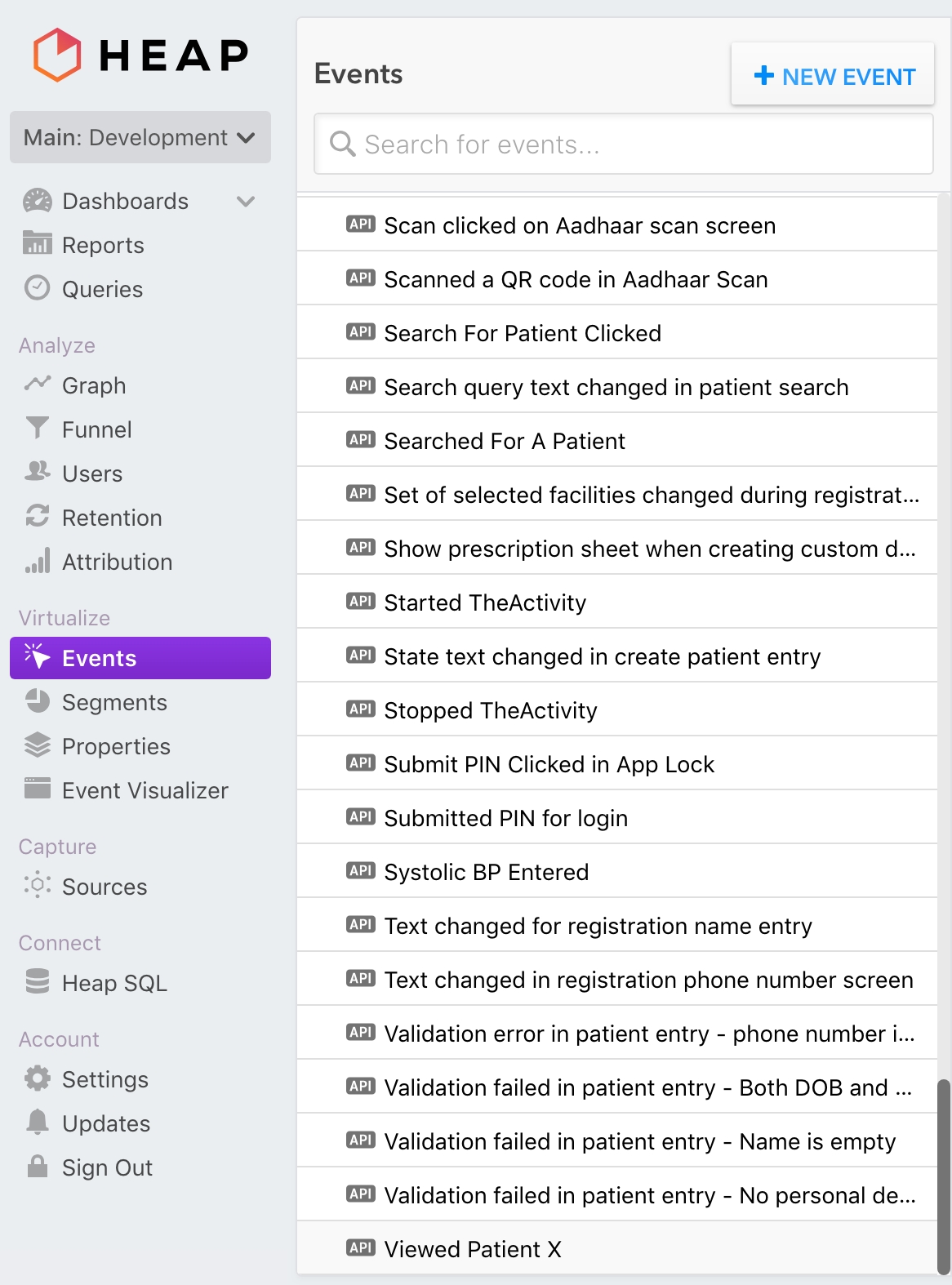
In the Heap UI, go to Events and in the list of custom events, select Viewed Patient X.
In the event definition section, scroll down to the Edit Event Criteria section, update the patientId filter with the patient ID and click on "UPDATE EVENT".
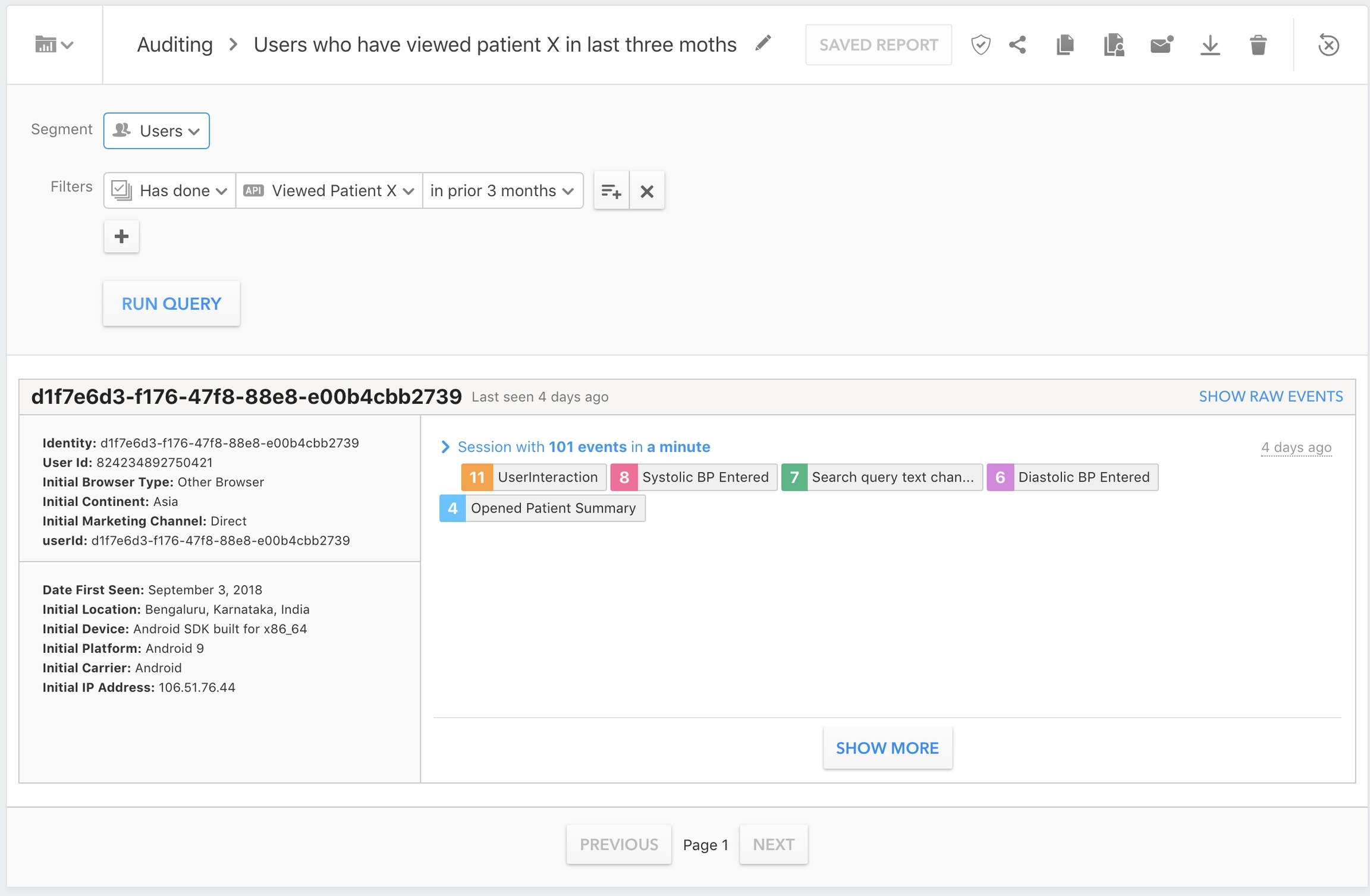
In the Reports/Auditing section, select the Users who have viewed patient X in last three months report.
In the report page that opens up, click on "RUN QUERY" to generate the report and get all the User IDs that have viewed a particular patient.
The user UUID
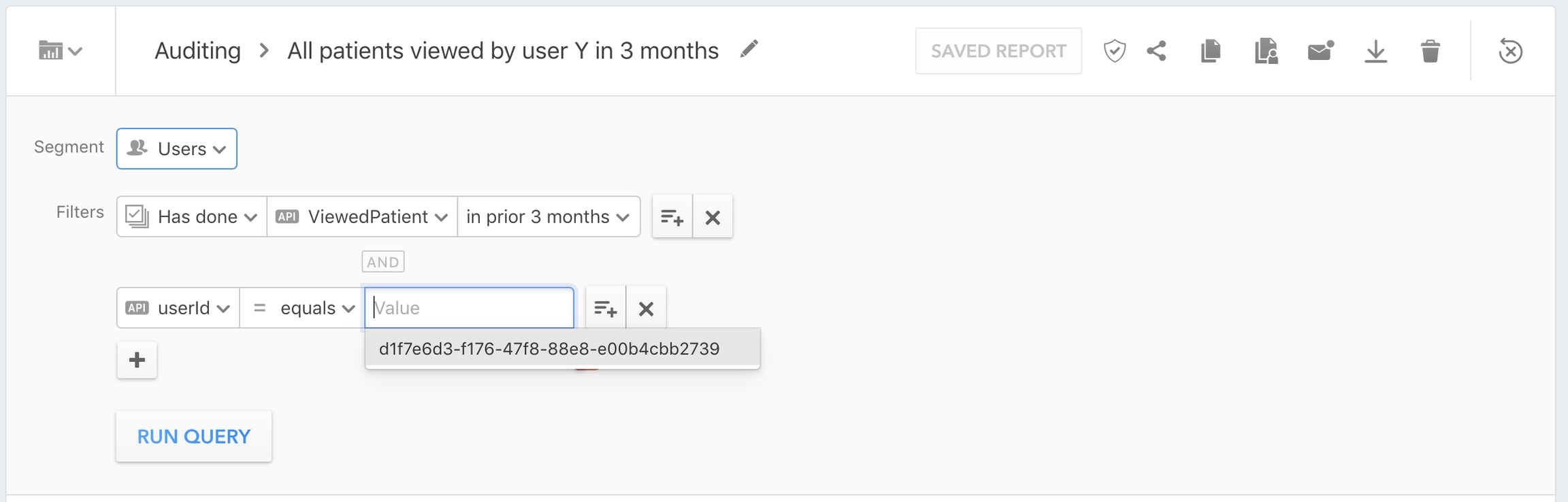
In the Heap UI, go to the Reports/Auditing section, and select the All patients viewed by user Y in 3 months report.
In the report detail page, update the userId filter with the UUID of the user to search for and click on "RUN QUERY".
Click on the "SHOW RAW EVENTS" button to view the detailed list of events.
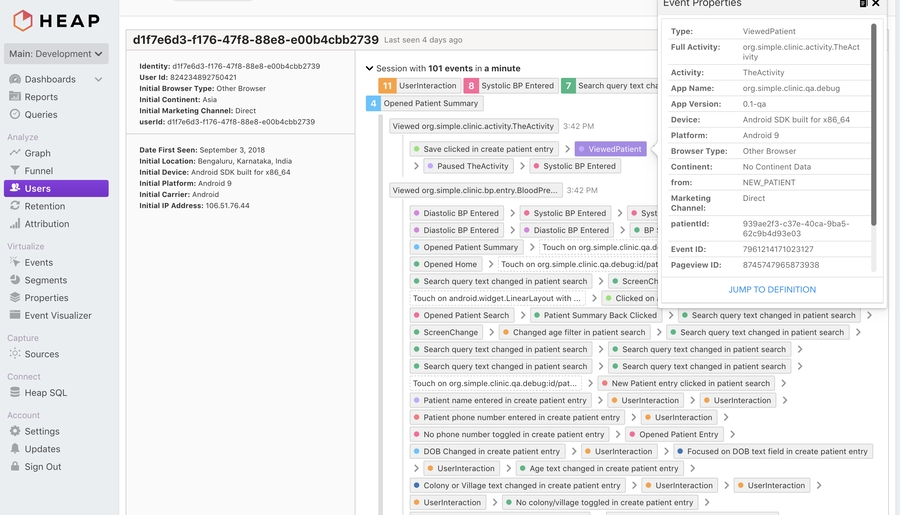
In the list of raw events that shows up, look for the event ViewedPatient. Clicking on it will show detailed properties of that particular event. It should contain a property patientId which indicates the patient whose details this user looked at. Looking over all the events (Don't forget to click on "Show More" to load pages of raw events), the patient IDs viewed by this user can be extracted.
Clinics can be very different, but we will describe some typical workflows for data entry into the Simple Android app for clinicians.
Important: Clinic workflows can be very different. As of April 2022, Simple is used in >7,000 facilities, from small community clinics all the way up to large district hospitals. We do not design for a specific workflow, we design for Simple to be adaptable in many situations.
A district hospital is the largest public hospital in a region. There is generally only 1 or 2 district hospitals per district.
A typical district hospital will have a large outpatient department (OPD) with long lines of patients queued from 8am in the morning until about 2pm. Most patients did not come to the hospital for hypertension — they likely came for an acute issue — but because of the high footfall at the clinic, it's an excellent place to opportunistically identify many people with hypertension.
A district hospital likely has a dedicated Non-Communicable Diseases Corner (NCD Corner) where patients are tested for blood pressure (BP) and blood sugar readings. The NCD Corner is often located near the OPD intake desk. A NCD Corner might be staffed by a small team of junior nurses and a staff nurse overseeing it. The NCD Corner staff will maintain the hypertension registers and will be the primary users of Simple through the .
A large facility like a district hospital will have many medical officers and will often have specialists on staff. This means that patients can be diagnosed here and medication can be prescribed and supplied.
A district hospital will have a dedicated pharmacy, with hypertension protocol medications and other medications from the "essential drugs list" in stock.
OPD intake: Patient waits at OPD in-take counter. At the counter, a clerk gives each patient an OPD slip (a single piece of paper) and records their basic demographics into a register. Adult patients are redirected to the NCD Corner.
NCD Corner: Patients queue at the NCD Corner for 10-30 min. They then have a BP measure and sometimes a blood sugar measure. The patient's BP reading is written on their OPD slip. If the patient has not yet been diagnosed with hypertension and their BP is ≥140/90, they are redirected to a medical officer who is stationed in a room nearby.
Medical officer's office: Patients queue to enter the medical officer's room. When they reach the front of the queue, the doctor will give them about 2-3 minutes to explain their symptoms, glances at notes on the patient's OPD slip, takes their BP, diagnoses them (if BP is high), and prescribes medications if diagnosed. Any patient who is diagnosed should be redirected to the NCD Corner to be enrolled in the hypertension program. Note: In many large hospitals, medical officers are too busy to use Simple.
A primary care hospital can take many forms. A typical PHC might have 2-3 medical officers but they may not always be present. A PHC is the local hosptal where patients can be diagnosed and where new prescriptions can be written. A PHC might have 3 or 4 rooms but usually doesn't have inpatient care.
In some PHCs there will be a specific day of the week for hypertension and diabetes follow-up care, so patients will be encouraged to come on that day. In other PHCs, hypertension patients are treated whenever they come in.
A small intake desk (often also the pharmacy) will take the patient's demographics and will give them an outpatient paper slip (OPD slip). Patient then queues to see the medical officer.
Medical officer: The MO will typically take the patient's BP and may diagnose the patient if their BP is ≥140/90. They will write a prescription and counsel the patient to return in 30 days. They may reassign the patient to a local community facility if it's more convenient for the patient for follow-up visits. The medical officer might be the primary user of Simple in this facility — they'll record the patient visit into Simple.
Patient leaves and picks up medications from the front desk on the way out.
A community facility is a local 1-2 room facility in a village and likely does not have a medical officer. A community facility traditionally was focused on maternal and child health, but likely now is treating chronic and simple diseases. If there is no medical officer, the facility can likely only refill medications for patients with controlled BP and refer patients in need of diagnosis or treatment intensification to a PHC or larger hospital.
Some Health & Wellness Centers in India (HWC) have a Community Health Officer (CHO) who is empowered to treat simple conditions. In some instances, they can treat uncomplicated cases of hypertension.
The CHO, Auxiliary Nurse-midwife (ANM), or next most senior staff will greet and treat patients. Lines are typically short.
The same person who is treating patients typically records BP measurements, medication refills, and other details into Simple.
We appreciate your help in making Simple better for everyone!
Praveen Kumar at WHO India has compiled an excellent guide on what program officers should do when healthcare workers encounter issues using Simple:
✋🏽 What surveillance officers should do when they encounter a bug or issue with the Simple app
If you use Simple in the field and want to help the tech teams behind Simple with useful bug reports, please reference this helpful guide on how to triage and document issues:
🐞
📱 File a bug about
🖥️ File a bug about
Click on New issue
Define the bug succinctly in the title. For example: App freezes when user clicks 'Register as new patient'
In the description, record steps to reproduce the bug.
Attach screenshots as supporting documentation
Include the app version, device model and Android version in the description
For bugs on the Simple Dashboard, include browser and version
Specific information related to localizing the Simple Android app
There are several full-time designers and UX researchers on the Simple project. Please join us on Slack if you would like to contribute.
On the next screen, click "Register as new patient"
Behaviour: App freezes
Expected behaviour: Redirect to page where other patient details are requested
Don't forget to label your issue Bug
NCD Corner: Diagnosed patients come back to the NCD Corner. Each patient's details are recorded into Simple and the doctor's diagnosis, prescription, and BP reading are entered for this visit. The staff will ask where patients would prefer to receive follow-up care and will change the "assigned facility" to a local facility (see note below). Patients are counselled to return for care in 30 days.
Pharmacy: Patients are then directed to the pharmacy to pick up ~30 days of medications. In India or Bangladesh, these medicines are free, but in other countries like Ethiopia there is often a fee.


masterWhenever translations for a specific locale are done, Transifex will automatically raise a pull request, which a maintainer can merge (See #965 for an example).
The Transifex GitHub integration settings can be found on the project settings page under the Integrations section.
Clicking on Edit Settings opens a page with multiple sections. The sections and their configuration are described at this LINK.
In the GitHub integration settings, there is a language mapping section that tells Transifex how to convert from the locale conventions that it uses to the locale conventions that the Android app uses. This will be used by Transifex when raising pull requests to merge new translations into the app.
The current mapping (at the time this article was written) looks something like this:
On the left are locale codes in the Transifex convention, while on the right are the locales in the convention that the Android app expects. Whenever a new language is added to the app, this mapping table also needs to be updated.
The Transifex integration has currently been setup to automatically raise pull requests whenever a language is 100% translated. Sometimes, however, we might need to pull partially translated languages manually and put them in the app. Transifex supports this use case as well.
Login to the Transifex platform.
Once logged in, on the Dashboard tab, with All projects selected on the left navigation bar.
Click on the simple-android project, and then click on Languages in the sidebar.
The list of languages appears. Click on the language you manually want to download translations for.
The list of source files in that language appears. Currently, the Android app has only one source file, strings.xml. Click on it, and the following view opens. Click on Download for use to download an Android string resource file that can be dropped into the project.
The name of the file does not match the Android conventions when downloaded manually. You should rename the file to strings.xml to match the conventions.
Place the strings into the appropriate resource directly and raise a pull request with the new strings.
Regardless of whether the string resources are raised automatically via Transifex, or manually added, a new language does not automatically show up in the list of languages the user can select via the Settings screen. In order to add a new language to the screen, add an entry to the SettingsModule class (LINK).
All of the user interface elements for the Android app and some of the Simple dashboard are now on Figma. Please feel free to 'borrow' or 'steal' anything from our public Figma project. We consider it to be public domain or CC0: Designs for app in use - Here Designs in exploration - Here
Screenshots on our website for a curated list of screens with brief explanations
Figma document of most screens in the Android application
Figma document of most screens in the Simple Dashboard
BP Passports that are given to patients as an ID and a record of recent BPs and medicines. Here are the printing requirements once you have all BP passports with unique QR codes in a sharable PDF format.
QR code booklets are provided to the facilities that already maintain a booklet for each patients
App usage guidebook given to new users
Blood Pressure Checklist
for editing in Adobe Illustrator, Sketch (979kb)
version
(1.6 MB)
Technical hiring is an investment for all parties involved. At Simple.org, we pledge to iterate and improve the process for a positive applicant experience.
Resumes should be a snapshot of the work YOU contributed to a project. This is your chance to brag about your work, not just the project.
Keep it short - 2 pages maximum.
Keep it simple - photos, family, or demographic information is neither necessary nor encouraged.
We don’t use keyword matching software. Simply mention technologies relevant to the position you’re applying for.
User-centricity is a core value of our tech team - which is why Simple.org follows an offline-first architecture. Adopting this philosophy requires commitment and close collaboration from both our frontend and backend teams.
The questionnaire is a way for you to tell us more about your approach to delivering software that’s both reliable and easy to use.
Your responses to the questions will help us determine whether to move forward with the next stage.
30min
Once the hiring manager reviews the resumes and questionnaires, passing candidates will be referred to the Talent Team to schedule a phone conversation. We want to make sure we’re having a conversation about role, compensation, schedule and any other expectations sooner than later. This is your chance to ask any questions about the organization, our values, way of working, etc.
Take home + 90 minutes
This stage will consist of testing your skills as a developer. The exercise will be tailored to the skills needed for the job - not theoretical questions about computer science.
Take home exercise. This will be tailored to the position and level being considered. We recommend giving yourself no more than 2 hours to complete the exercise. Remember, we don’t expect this to be perfect. This exercise helps start the technical discussion and gives you a flavor of the types of problems we work on solving.
Technical discussion. Use this time to tell us more about your approach to the take-home exercise, what assumptions you made, and anything you would have done differently if you had more time. This is also the time to have a conversation and tell us about past projects and accomplishments you’re most proud of.
30 minutes
Frontline workers are the most critical part of the healthcare delivery system. Our product features are designed to keep their focus on patient care, not on their smartphones. This obsession with building the most user-friendly and offline application runs through every member of the team, whether you’re a designer, frontend developer, or backend engineer.
The final stage of the interview is your chance to demonstrate user-centricity in your craft. This stage will also be a place to ask questions about the project, work culture, etc.
The final interview will be a casual conversation with the hiring manager, an engineer, and schedule-permitting a designer. Cross-team collaboration is very important to our culture, so we want to give you a chance to meet a cross-section of the team and ask questions about how we work across disciplines.
Common terms you'll run into on the project.
Admin: Anyone with access to the back-end dashboard, roles and permissions are listed below.
Owner: Simple tech team members. Has all permissions listed below:
View Dashboard for all Organizations
View and Download the Overdue list (facility-wise)
View and update Adherence follow-ups
Blood Pressure (BP): Combination of systolic and diastolic BP readings in mm Hg
Recorded as Systolic/Diastolic Ex. 120/80
BP medicines: Name(s) and dosage(s) of medication currently prescribed to a patient
BP passport: Physical ID provided to the patient
How we localize the Simple apps (mobile and backend) and other projects.
Currently, there are four separate projects that are localized, along with the resources on each project:
The Android application (LINK)
Strings displayed in the user interface
The server application ()
HTML for the progress tab in the app
HTML for the help section in the app
Strings returned in API responses that are displayed to the end user
The YouTube training video ()
Subtitle files
The printed material that is delivered to the health centres Simple operates in
BP Passports
SOP training manual
We started by using Google Sheets to manage translations for the projects. This quickly got problematic since syncing the source strings with the projects got cumbersome and started requiring a lot of manual effort to manage. In addition, this process was also error-prone.
We evaluated and decided on a platform called to manage translations across the board for all the projects. This platform has many benefits, primarily that it integrates with our project version control to automatically keep the source strings and translations in sync.
Add the language to the project on Transifex.
Invite translators from the translation service for the language on the project.
The translator begins translations.
The turnaround time is 6-7 business days from the date of approval of the quotation.
The translation service will work on any new strings in existing languages on an ongoing basis, and will send Kate a weekly quote every Monday. Kate will approve amount as needed.
The turnaround time for new strings is 2-3 working days i.e. any new strings added on Monday will be ready latest by Thursday the same week.
The translation service will also address any issues that have been raised weekly, and incorporate them in future translations.
RTSL will send GP the print materials as InDesign files, and also upload all the text into Transifex for all languages
GP will translate in Transifex
RTSL reviewers will review in Transifex
Once the translation has been approved in Transifex, GP will import the translation into the InDesign file/do any necessary layout adjustment

This is a deceptively difficult question: Simple is used by thousands of healthcare workers and health systems managers.
hi_IN: hi-rIN
bn_IN: bn-rIN
bn_BD: bn-rBD
pa: pa-rIN
ta_IN: ta-rIN
te_IN: te-rIN
kn_IN: kn-rIN
mr: mr-rIN
om: om-rET
ti: ti-rET
Manage Organizations, Facility groups and Facilities
Manage Admins
Manage Protocols
Manage Users and approve / deny their access to the Simple mobile app
Search Audit Logs
Organization Owner: Administrators for one or more Organizations, e.g. PATH admins. Has the same permissions as Owner, but limited to the organizations they control. They also can't add organizations.
Supervisor: Program supervisors, primarily CVHO and STS. Permissions limited to:
View Dashboard for Facilities that they have access to
View and Download the Overdue list (facility-wise)
View Facilities they have access to
Manage Users and approve / deny their access to the Simple mobile app
Analyst: People who just need dashboard data, e.g. an epidemiologist or health expert Permissions are read-only, limited to:
View Dashboard for Facilities they have access to (District page only, not User page
No overdue list or management access
Counselor: Call center employee or counselor who will follow up with the patient. Permissions limited to:
View and Update the Overdue list
View and Update Adherence follow-ups
No dashboard or management access
BP passport code: UUID printed on BP passport as a QR code, which can be scanned to find the patient.
BP passport short code: A 7-digit number that summarizes the UUID, which can be entered if the scanner does not work.
Business ID: IDs other than BP passport that may be associated with a patient (such as Driving License, State Health ID etc.)
Call list: Used interchangeably with overdue list
Clinic: Used interchangeably with Facility
DM: Diabetes mellitus (the clinical term for diabetes)
Facility:
Sub-centre
PHC (Primary Health Centre)
CHC (Community Health Centre)
District Hospital (or)
Any Public or Private Healthcare Facility
All Facilities are identified by a Facility ID
Users can be linked to one or more Facilities
Facility group: Group of one or more facilities
Users within a facility group sync patient data amongst themselves
Users outside a facility group do not sync data amongst themselves
Follow up list: List of all patients who have missed their appointment (including ones without a phone number). Displayed on the web dashboard.
HTN: Hypertension
ICMR: Indian Council of Medical Research
IHMI/IHCI: Indian Hypertension Management Initiative, now called India Hypertension Control Initiative
Overdue list: List of patients who have a phone number and who have missed their appointment. Displayed on the nurses' phone.
Organization: One or more facility groups that are part of a single administrative unit
Protocol: Name(s) and dosage(s) of medication recommended to be prescribed to a patient based on their current BP and BP history.
Patient log: List of all patients with a BP recorded in that facility. Displayed on the nurses' phones.
Result of a phone call made with the user's number masked:
Completed: Connected to the patient
Canceled: User cut the call before it was connected
Busy: Patient’s number is giving a busy tone
No answer: Patient did not answer
Failed: Call failed (likely due to bad phone number or operator-level disconnections)
Unknown: Result of the call is unknown
Security PIN: 4 digit PIN used by the Nurse to login to the app
User: User of Simple app (i.e. a healthcare work not a patient)
Tips
Instead of “Worked on food delivery app using Kotlin”, say “Architected and implemented the delivery tracking feature for a food delivery application using Kotlin”.
There’s no need to list every technology you’re familiar with as long as you can demonstrate familiarity with the ones relevant to the position you’re applying for.
Evaluation Criteria
Clearly communicates your contributions on past projects
Demonstrates ability to learn on the job
Tips
Answers should be 3-4 sentences each
Give examples from prior experience, when possible
Evaluation Criteria
Clear communication style
Mission-driven
Evaluation Criteria
Code quality
Attention to quality of software
Focus on end users
Login
WhatsApp graphic
SMS reminders
Invite the reviewer(s) to Transifex.
Share the instructions on how to use Transifex (screen recording + guidelines below).
The reviewer will go through the translations for the app and the BP passport
When there are proposed changes, the reviewer can propose a change for translator by clicking on Add issue and leaving a note.
If the overall quality of the translation is poor, Kate will set up a call between the reviewer and the translation service.
We will email the translation service to let them know that the review is complete. They will address any issues that have been added by the reviewer by either
Accepting the change by editing the translation.
Leaving a comment to explain why the recommendation has not been accepted.
Translation service completes all the translations for all projects on Transifex and the design files.
Once >95% of the strings have been translated for a particular language, they will be pulled back into the app and the server.
Every month, the reviewer can look at the strings that were translated in the last month using the date filter (we can send an email to remind the reviewer to do this?). The reviewer can propose changes by adding an issue.
GP will post the InDesign file with the approved translation to Transifex
Medical officers (MO) are empowered to treat patients, which in the context of hypertension and diabetes care means that they can titrate (i.e. intensify) a patient's medications if appropriate. In a small hospital (PHC), medical officers might be the primary users of Simple. In a larger hospital (CHC, SDH, DH), many medical officers are too busy to enter data and more junior staff will manage Simple.
In many facilities, nurses manage the use of Simple. Particularly in large facilities, a Non-Communicable Diseases (NCD) Corner is likely staffed by nurses who take BPs and manages Simple. Patients with high BP measures should be referred to a medical officer, who will manage treatment. Often patients return to the nurse after seeing the medical officer, so their data can be entered. They are the primary users of the Simple Android App.
Community health officers (CHO) are mid-level health staff who can treat some non-complex conditions and are primarily the senior staff at Health & Wellness Centers (HWC) in India. In some contexts, the CHOs treat patients and record their details in Simple. Note: There are many HWCs in India, so there are many CHOs.
Some hospitals have dedicated staff for data entry. They are responsible for submitting monthly data (usually in spreadsheets or paper forms) to local government officials. They might correlate data from the paper registers with records in Simple and they might compile totals from the Simple's Progress Tab to submit as part of their process.
The chief medical officer manages the hospital and is usually the most senior doctor. The chief medical officer might use the Progress Tab in the Simple Android app to monitor the facility's progress towards controlling patients' blood pressures.
Health system managers represent a wide group of people who are responsible for optimizing the health system to help more patients to control their blood pressure and reduce deaths.
At the Ministry of Health in a state or country, officials are responsible for tracking many programs, including hypertension and diabetes. They might use the Simple Dashboard to track progress in their region, but more likely they see charts when a nodal officer or cardiovascular health officer visits with them once-per-month to advise on how to strengthen the program.
A nodal officer is a government official with a particular focus area — there are NCD nodal officers in many Indian states or districts. In some states (e.g. West Bengal), the district nodal officer has a similar function to the cardiovascular health officer. The nodal officer might monitor the Simple Dashboard or (like the state officials) they might only see the data when a cardiovascular health officer shows them charts.
Cardiovascular health officers
CVHOs are surveillance officers hired specifically to manage 1-2 districts of a hypertension program. The India Hypertension Control Initiative has many CVHOs across India, primarily focused on improving the program. The same people are called different things in other countries. They are the primary users of the Simple Dashboard.
Affinity Designer (173 KB version 1.7)
The main features of the Simple web-based Dashboard, which is used by health officials, surveillance officers, and system administrators
The key reports in Simple are based on the WHO's HEARTS Technical Package for managing a large-scale hypetension control program and most indicators closely match the HEARTS indicators.
The primary function of the dashboard is to drive feedback loops for people who oversee health programs. The primary indicator of the success of a hypertension control program is:
How many registered hypertension patients returned to care in the last 3 months and their blood pressure was under control (<140 systolic and <90 diastolic)?
Fundamentally, many of the report graphs and tables in Simple explain why more patients aren't controlled. The reports and trends help health officials to identify questions like:
Are patients returning to care?
If patients aren't returning to care, are healthcare workers calling them?
Are we delivering text messages successfully to return patients to care?
The key reports shown at the national, regional, and facility levels track how many patients visit with controlled BP, visit with uncontrolled BP, miss visits, and are registered into the program.
Cohort reports are used to track the early progress of newly registered patients. The idea is that patients that start well in the program will succeed long term.
Another key function of the Simple Reports is to enable health officials and epidemiologists to download key data and patient lists for surveillance and analysis. Several different CSV files are available to download for further analysis.
In several countries we integrate a business intelligence tool called Metabase, so authorized users can query the Simple "Data Pipeline" data to create custom reports. This is a powerful way for epidemiologists to find trends and ask questions of the data.
Many surveillance officers meet with the local officials to share progress and advocate for changes within the health system. They often use Microsoft Excel to generate custom reports to illustrate their points. The Simple team has created an Excel template that can be auto-populated with downloaded data from the Dashboard. See example below:
Surveillance officers can download the template, then download a specially formatted data dump from the dashboard, fill out a few fields (e.g. "Recommendations for action in the field") and then use the report for their work.
Simple also generates little mini Reports as graphics that can be shared monthly with health officials over Whatsapp or email, which show a snapshot of a facility's or district's performance.
Another section of the Dashboard is used my surveillance officers to compare all of their facilities to see which are high performing and which need assistance.
Simple can also be used to track anti-hypertensive and diabetes drug stock. See for a description of how healthcare workers submit data. In the Dashboard, officials can view the current Patient days of drug stock based on a simple algorithm, which calculates based on a facility's registered patients.
Officials can also enter the drug stock numbers through the Dashboard for facilities that submit data using Excel, Whatsapp, or other means.
The Dashboard has an entire section to display the overdue patients within a region or at a specific facility. The dashboard could hypothetically be used to run a centralized call center to contact patinets, but we haven't yet had the opportunity to try this anywhere at any real scale.
Note: Patients in the screenshot below are all fake.
Inevitably, some patients get registered twice. With an offline-first app and with millions of patients enrolled, this is impossible to avoid. Simple has a rudimentary deduplication service that identifies very likely matches based on Patient IDs, Names, Phone numbers, and similar Addresses. Dashboard admins can merge patient records, into a single record.
The Dashboard is a convenient one-stop-shop for program managers. We include common materials such as:
Training videos
Training presentations
Deployment checklists
FAQs
Simple has an unusual method of enrolling new Simple Android app users. Android app users self-enroll by doing the following :
Download the app from the Play Store
Enter their own name, mobile, and choose a PIN
Choose their work facility from a list of all Simple facilities
User is now in a temporary status
This system makes training large groups much faster, since a trainer doesn't need to pre-approve users. It also means that a busy clinician can start recording patients at her facility even before being approved — but she can't see any previous patient data nor sync to the cloud before she's approved.
Admins can select which Android users are qualified medical officers who can be linked to telemedicine sites.
The pick list of medications in the Simple app is different in every region (each region has a different set of commonly prescribed medications). This list is managed through the Dashboard and synced to the device based on the facility's region.
Typically follow-up appointments are 28 days. This time period can be easily managed from the Dashboard per region.
Facilities can be added through the Dashboard.
Regions are important both for reporting and for data sync to Android devices.
Allows Admins to upload a spreadsheet and add many facilities at once.
Organizations are the top level structure for facilities — and are rarely used. All facilities in India are currently under the IHCI (India Hypertension Control Initiative) organization. In the future, a private hospital chain could theoretically use Simple on the same infrastructure but as a separate organization.
Dashboard admins can have different levels of permissions. Admins can add new admins. New admins are given permission to view or manage a set of facilities and can have permissions such as:
Manager. Can manage regions, facilities, admins, users, and view everything
View: Reports only. Can only view reports
View: Everything. Can view patient data and all facility data.
Many places have used paper records to manage patients. The bulk import function allows data entry operators to fill out a spreadsheet with thousands of patient records and import that historical data into Simple.
Power users can manage specific features by country or even by Dashboard admin. This allows the Simple team to test new features only flagged on for specific Dashboard admins or to enable features only in some regions.
Every two weeks, we conduct telephonic interviews with 5 different users of Simple. We ask them about their usage of features of the app, satisfaction rating and issues faced.
Following are the tests that we've conducted with users who work at public health clinics where Simple is deployed.


Acronym
Definition
A5/A10
Amlodipine 5 mg, Amlodipine 10 mg
ANM
Auxiliary Nurse Midwife (can run a subcenter)
ASHA
Accredited Social Health Activist (treats patients in rural areas)
CBAC
Community-Based Assessment Checklist
CC
Community Clinic
CDSS or CDS
Clinical Decision Support System
CHC
Community Health Centre
CHEW
Ethiopia's Community Health Extension Workers
CHO
Community Health Officer
CVHO
Cardiovascular Health Officer
DM
Diabetes Mellitus
EHCI
Ethiopia Hypertension Control Initiative
FHIR
"Fire" interoperability standard (Fast Healthcare Interoperability Resources)
FMoH
Federal Ministry of Health
HCD
Human-centered design
HCW
Healthcare worker (e.g. nurse, doctor, pharmacist)
HIT
Health Information Technology
HTN
Hypertension
GoI
Government of India
ICMR
Indian Council of Medical Research
IHCI
Indian Hypertension Control Initiative (new name of IHMI)
IHMI
Indian Hypertension Management Initiative
IPM
Iteration Planning Meeting
MoH
Ministry of Health
NCD
Noncommunicable Disease (e.g. hypertension, diabetes, cancers)
NCD Corner
A in-hospital clinic focused on hypertension and diabetes
NHF Bangladesh
National Heart Foundation of Bangladesh
NORAD
Norwegian Agency for Development Cooperation
NPCDCS
National Programme for Prevention & Control of Cancer, Diabetes, Cardiovascular Disease & Stroke (India-based Program)
PAHO
Pan American Health Organization (WHO for Latin America)
PHC
Primary Health Center
RTSL
Resolve To Save Lives
SAD
Slum Area Dispensary
SC
Subcentre
SDH
Sub-District Hospital
STS
Senior Treatment Supervisor
UHC
Upazila Health Complex (Bangladesh's equivalent of an Indian District Hospital)
UPHC
Urban Primary Health Center
USAD
Urban Slum Area Dispensary
VS or Vital
Vital Strategies, previously the parent of Resolve to Save Lives
WHO
World Health Organization
Are patients being registered in large facilities and reassigned to smaller, more convenient facilities?
Are enough patients being registered?
Which facilities are registering patients?
What is the population of a region and how close are we to identifying and registering a realistic percentage of patients there?
Are patients returning to care but they aren't controlled?
If patients aren't controlled, are their medications intensified per protocol?
At what point of the hypertension protocol are the most patients being controlled?
Are hospitals well-stocked with essential medicines?
Are patients being given enough medications so they aren't forced to return to the pharmacy at the hospital too often?
Is Simple being well-used?
Are we seeing an expected number of follow-up visits recorded?
Which users are doing the most activity?
Are BPs being recorded accurately?
A Dashboard admin needs to call the user, verify they're permitted to manage patients, then they are approved.
Once approved, the user is in approved status and Simple starts syncing data to-and-from the cloud.
Power user. Can manage the entire deployment.


Gurdaspur, Punjab
April 2019
Gurdaspur, Punjab
March 2019
Bathinda, Punjab
March 2019
PATH clinics, Mumbai
December 2018
Bathinda and Mansa, Punjab
November 2018
Bathinda and Mansa, Punjab
October 2018
Bathinda and Mansa, Punjab
October 2018
Bathinda and Mansa, Punjab
Various hospitals, Bangalore
Date
Topic
Location
November 2019
Bathinda, Punjab
September 2019
Sindhudurg, Maharashtra
August 2019
Remote
July 2019
Date
Topic
Location
October 2019
Obvious office, Bangalore
June 2019
Obvious office, Bangalore
May 2019
Obvious office, Bangalore
April 2019
Date
Topic
Location
March 2019
Doctors' clinics, Bangalore
December 2018
Doctor's clinics, PATH network, Mumbai


This document is an illustrated sequence that depicts the end-to-end experience of Simple’s primary users: the nurses.
Depicted here is the story of Manjeet, a fictional staff nurse at a public PHC (Primary Health Centre) in Punjab, India. Manjeet is fairly new to using a smartphone.
After each scenario, are common concerns that we hear from users.
Manjeet’s supervisor hands her a memo about using Simple. She is asked to download it from the Google Play Store and record patients with hypertension on it.

Is this yet another government program that will not last?
I have never installed an app… how do I do it?
Will this be a lot of extra work?
Will this cost me money?
How do I learn how to use this app? Will the memo contain instructions?
I have to learn this new thing now?
Should I do both paper and app work now?
I don’t understand English that well. Who will help me?
I don’t have an Android, what should I do?
During her free time, Manjeet downloads Simple. She starts understanding how to use the app.
Will this consume a lot of space on my phone?
Will I have to delete my personal files for it?
Will this slow my phone down?
Will I have to pay for the mobile data?
Will this eat up my data pack?
I’m comfortable making entries on a physical register… do I really need to use an app?
Patient data is critical. What if I make a mistake while entering it?
This app looks complicated. How long will I take to learn and understand everything?
What is a PIN? What if I forget the pin? What pin should I enter?
A normal day in Manjeet’s life. She handles two or more patients at a time - checking BP, giving instructions, and entering patient data simultaneously. Patients travel back and forth the doctor and nurse’s room before exiting the clinic. Thus, the app is also not used in a linear fashion per patient. Patient data is revisited back and forth as well.
I must hurry! The other patients are waiting.
Will this patient come back to me after seeing the doctor?
The doctor has asked the patient to come back after 15 days, but I can’t find an option to schedule for 15 days in the app.
Is it okay if I write down details in the register and enter them in the app later? Manually writing them down is easier.
Patients think that I am using Facebook at work?!
Manjeet registers a patient for the first time by filling out a BP passport. She reminds the patient to bring the passport the next time the patient is visiting the clinic.
I have never used anything like this (QR code) before. What does it do?
Am I doing this right?
What will happen if patients do not bring these cards?
I don’t have internet connectivity. Will the patient details be saved?
My camera is not working. What should I do?
It is a hassle to write this on a register and record it on the app as well.
Patient: “Is this nurse playing on her phone or what? What’s happening?”
What if someone else has recorded this patient’s data previously? How will I get it?
Why should I enter patient details? It is not my job to do this. Just like the receptionist enters details on the OPD slip, they should do this too.
This is cool and high-tech!
Manjeet is called for an emergency. She had to stop attending the patients and be present at the ICU.
I wish someone could fill in for me while I’m at this emergency. My patients are waiting.
Who will note down patient details in my absence?
Who will enter data into Simple in my absence?
Will I have to give my phone to someone else to enter patient data?
Will I have to enter all the data from paper to app when I go back?
I am overworked and I don’t even get paid enough!
Manjeet looks up a patient using BP passport.
Scanning is not working because the card is torn. I’m stuck!
I scanned the card but there is no patient. What do I do?
The patient brings another family member’s card. What should I say to him?
The patient brings a card which he lost during his previous visit. He was assigned a new card. He lost the new card and got the old card. Will it work?
During her free time, Manjeet calls overdue patients. She makes a note of the patient’s responses in her notebook.
Will patients visit on these scheduled dates?
I have a long list of patients to call. I feel overwhelmed.
Who are the most important patients to call?
Why are the patients not taking my calls?
Will patients call me back at 2 am and interrupt my life?
What shows on the patient screen? Is it my number? Or does it say Simple?
I got the wrong number again. Is this even useful?
Is my balance being used? How do I know?
What are those beeps when I call the patient?
Why should I have to call these patients?
Will the patient’s son inform him/her about this? What should I mark in this case on the app? Should I mark remind me later?
The list is way too long. I should postpone this work.
Hard to find a patient from the overdue list. How else to check of a patient has an appointment?
I had to hear rude comments from patients.
When did I last call this patient? How many times have I tried calling them already?
We don’t have mobile reception in my facility. How do I make these calls?
A patient, Jasmeet Kaur, forgets to bring her BP passport. Manjeet has to manually search for the patient but finds multiple search results for Jasmeet Kaur. She is frustrated as the patient is old and cannot recall her husband’s phone number.
Every second patient who comes here is named Jasmeet Kaur. How do I find her without her phone number?
Did I enter her spelling wrong?
Did I miss to register her as a patient the last time? Is that why it is not showing up?
This is a really long list of patients… can I ever find the right person?
I remember I entered this patient last week. Now I can’t find them!
Arwinder had entered this patient yesterday. I am not able to find this patient on my phone.
During a discussion with her supervisor, Manjeet shows him the progress tab.
What is he/she going to say?
Will it affect my work/pay?
I have great progress. How will I be rewarded? Is it worth it?
It doesn’t show all my patients. What should I do?
Manjeet cannot find a registered patient on the app. She recalls that her supervisor said that she could put her issues on the Whatsapp group of Simple users. She thinks of interacting with people on the Whatsapp support group.
Who are the people in this WhatsApp group? I don’t want them to be able to see my number as I post this concern.
Is my supervisor in this group? How will he react to my complaint? Should I speak to him first instead?
Is this a silly concern? Should I even post it?
Is my concern a valid issue? Or is it something that I haven’t learned yet?
Will everybody judge me?
Should I post this question in English?
“This week’s list of highest users of Simple is” - makes me feel overwhelmed. Is this a competition?
I have a small facility. How can I be a part of the “highest user” reward?
I am a woman, I can’t share my phone number publicly.
Manjeet is transferred to another clinic. Her supervisor asks her to brief the nurse who will be replacing her with all the roles and responsibilities. Manjeet introduces the new nurse to Simple.
I learned this by myself. No one helped me. Why should I do this now?
Will he understand it easily?
What if he asks me questions which I don’t know answers to?
This is not part of my job. Why should I do it?
What if I teach him something wrong?
I know there are training documents… can I get more for my trainee?


Details on how to creating your own reports using Metabase, and the reporting tables.
Metabase is a tool that allows us to explore the data in Simple, and build reports without engineering support. If you are new to Metabase, you can start with one of our predefined templates, and explore further from there.
Alternatively, you can just click on "Ask a new Question", and choose "Custom Question". You can refer to Metabase's own documentation for a better understanding of how to use the query building interface.
Once you have generated a report, you can save it, share it with others, or even download the data to further analyse as spreadsheets or in other contexts.
Metabase is available for the following Simple environments.
If you're already familiar with Simple's data model and Metabase, you can get started with this quick demo.
To get started, open up the custom report template. Template links are provided below.
India:
Bangladesh:
Sandbox:
To start writing your custom report, click on the “Show Editor” button shown below.
This will open the report editor. It will look something like this. The key features are labeled in the image below.
As is, this template generates a monthly report of cumulative hypertensive patients assigned per district in a single state over the last 24 months.
Add filters to the purple “Filter” section to limit the report to what you care about. For example, if you want a monthly cumulative report of controlled patients in this state, add the following filter:
Htn Treatment Outcome in Last 3 Months = controlled
See the Reference at the end of this document for a full list of options.
You can modify the green “Summarize” section on the right to add more facets to segment the results. For example, you can break down the results by facility by adding the following grouping:
Assigned Facility Slug
See the Reference below for a full list of grouping options.
Read on further to understand the data in each of the reporting tables you can access in the questions on Metabase.
The following are the key properties that can be used to filter and group the report’s results in the purple “Filter” section.
To run a report on registrations, add the following filter to the purple “Filter” section.
Months since registration = 0
If you want to run a report that includes multiple filters such as controlled patients, uncontrolled patients, missed visit patients, in a single report, you can use a grouping instead of a filter. Group by the appropriate property in the green “Summarize” section.
For example, to generate a report of controlled, uncontrolled, visit-but-no-bp, and missed-visit patients, add the following grouping:
Treatment Outcome In Last 3 Months
Sometimes, you want to run a report where results are grouped by facility, but you also want block and district information next to each facility. In order to do so, simply add block and district as additional groupings in the green “Summarize” section, and they will be shown in the results.
The results will have block and district information next to each facility.
The following table is a summary of each of the reporting tables, and what they contain. Please refer to the sections below for details of the columns in each of these tables.
The reporting tables are building blocks that are built on top of raw data. The following diagram illustrates which raw tables they are based on, and how we build larger even building blocks from these tables.
Raw data tables: Data as recorded in the app goes into the transactional, or raw tables as seen in the first section of the diagram. These rows have all the detailed information collected as and when the nurse syncs the data via the Simple app. These tables have billions of rows, and are not well suited for querying reports.
Reporting tables: These are summarised tables created from the raw data tables for ease of creating reports. The summaries can be per-patient-per-month, or per-facility-per-month. Please refer to the above diagram for the description of each table.
Dimension tables: We can use these tables along with other reporting tables to filter and disaggregate data across time and geographical regions.
You can browse through the detailed schema on , or on .
Sri Lanka's MOH hypertension control program
Sandbox
A stable playground for the Simple team to work in
Is the patient under care, lost to follow-up, or dead
Treatment Outcome In Last 3 Months
Patient’s controlled status based on the last 3 months. Possible values are:
controlled
uncontrolled
visit but no BP
Months since registration
Months since the patient’s registration, as of the reporting month
Months since visit
Months since the patient’s last visit (with or without a BP), as of the reporting month
Months since BP
Months since the patient’s last BP measure, as of the reporting month
One row per facility, per month, for all months since 2018
reporting_quarterly_facility_states
A facility’s quarterly treatment outcomes
One row per facility, per quarter, for all months since 2018
Environment
URL
Purpose
Production
India
India’s IHCI program
Production
Bangladesh
Bangladesh’s NHF hypertension control program
Production
Ethiopia
Ethiopia's MOH hypertension control program
Production
Sri Lanka
Field name
Field description
Month date
The reporting month
Assigned organization slug
Assigned state slug
Assigned district slug
Assigned block slug
Assigned facility slug
The organization, state, district, block, or facility that the patients are assigned to.
Registration organization slug
Registration state slug
Registration district slug
Registration block slug
Registration facility slug
The organization, state, district, block, or facility that the patients were registered in.
Hypertension
Is the patient diagnosed with hypertension? (yes/no)
Diabetes
Is the patient diagnosed with diabetes? (yes/no)
Table Name
Description
Contents
reporting_patient_blood_pressures
Summary of a patient’s latest blood pressure
One row per patient, per month, from the month of the patient's registration.
reporting_patient_visits
Summary of a patient's latest visit where they had a BP/Sugar recording, an appointment, or a prescription drug refilled
One row per patient, per month, from the month of the patient's registration
reporting_patient_states
Summary of a patient's health information and computed hypertension indicators.
One row per patient, per month, from the month of the patient's registration.
reporting_facility_states
Htn Care State
Summary of a facility’s registrations, treatment outcomes, and patients under care


|----------------------------------------+-------------------+---------------------------------------------------------------------------------------------------------------------------------------------------|
| column_name                            | data_type         | description                                                                                                                                       |
|----------------------------------------+-------------------+---------------------------------------------------------------------------------------------------------------------------------------------------|
| patient_id                             | uuid              | ID of the patient                                                                                                                                 |
| gender                                 | character varying | Gender of the patient                                                                                                                             |
| current_age                            | double precision  | "Patient's age as of today, based on 'age', 'age_updated_at' and 'date_of_birth'. This will have the same value for a patient across all rows."   |
| month_string                           | text              | "String that represents a month, in YYYY-MM format"                                                                                               |
| hypertension                           | text              | "Has the patient been diagnosed with hypertension? Values can be yes, no, unknown, or null if the data is unavailable."                           |
| assigned_facility_id                   | uuid              | ID of the patient's assigned facility                                                                                                             |
| assigned_state_slug                    | character varying | Human readable ID of the patient's assigned facility's state                                                                                      |
| registration_facility_id               | uuid              | ID of the patient's registration facility                                                                                                         |
| registration_state_slug                | character varying | Human readable ID of the patient's registration facility's state                                                                                  |
| months_since_registration              | double precision  | "Number of months since registration. If a patient was registered on 31st Jan, it would be 1 month since registration on 1st Feb."                |
| quarters_since_registration            | double precision  | "Number of quarters since registration. If a patient was registered on 31st Dec, it would be 1 quarter since registration on 1st Jan."            |
| months_since_visit                     | double precision  | "Number of months since the patient's last visit. If a patient visited on 31st Jan, it would be 1 month since the visit on 1st Feb."              |
| quarters_since_visit                   | double precision  | "Number of quarters since the patient's last visit. If a patient visited on 31st Jan, it would be 1 quarter since the visit on 1st Jan."          |
| months_since_bp                        | double precision  | "Number of months since the patient's last BP recording. If a patient had a BP reading on 31st Jan, it would be 1 month since BP on 1st Feb."     |
| quarters_since_bp                      | double precision  | "Number of quarters since the patient's last BP recording. If a patient had a BP reading on 31st Jan, it would be 1 quarter since BP on 1st Jan." |
| htn_care_state                         | text              | "Is the patient under_care, lost_to_follow_up, or dead as of this month?"                                                                         |
| htn_treatment_outcome_in_last_3_months | text              | "For the visiting period of the last 3 months, is this patient's treatment outcome controlled, uncontrolled, missed_visit, or visited_no_bp?"     |
| htn_treatment_outcome_in_last_2_months | text              | "For the visiting period of the last 2 months, is this patient's treatment outcome controlled, uncontrolled, missed_visit, or visited_no_bp?"     |
| htn_treatment_outcome_in_quarter       | text              | "For the visiting period of the current quarter, is this patient's treatment outcome controlled, uncontrolled, missed_visit, or visited_no_bp?"   |
|----------------------------------------+-------------------+---------------------------------------------------------------------------------------------------------------------------------------------------| Column | Type | Collation | Nullable | Default
---------------------------------+-------------------+-----------+----------+---------
month_date | date | | |
month_string | text | | |
quarter_string | text | | |
facility_id | uuid | | |
facility_name | character varying | | |
facility_type | character varying | | |
facility_size | character varying | | |
state_slug | character varying | | |
cumulative_registrations | bigint | | |
monthly_registrations | bigint | | |
under_care | bigint | | |
lost_to_follow_up | bigint | | |
dead | bigint | | |
cumulative_assigned_patients | bigint | | |
controlled_under_care | bigint | | |
uncontrolled_under_care | bigint | | |
missed_visit_under_care | bigint | | |
visited_no_bp_under_care | bigint | | |
missed_visit_lost_to_follow_up | bigint | | |
visited_no_bp_lost_to_follow_up | bigint | | |
patients_under_care | bigint | | |
patients_lost_to_follow_up | bigint | | |


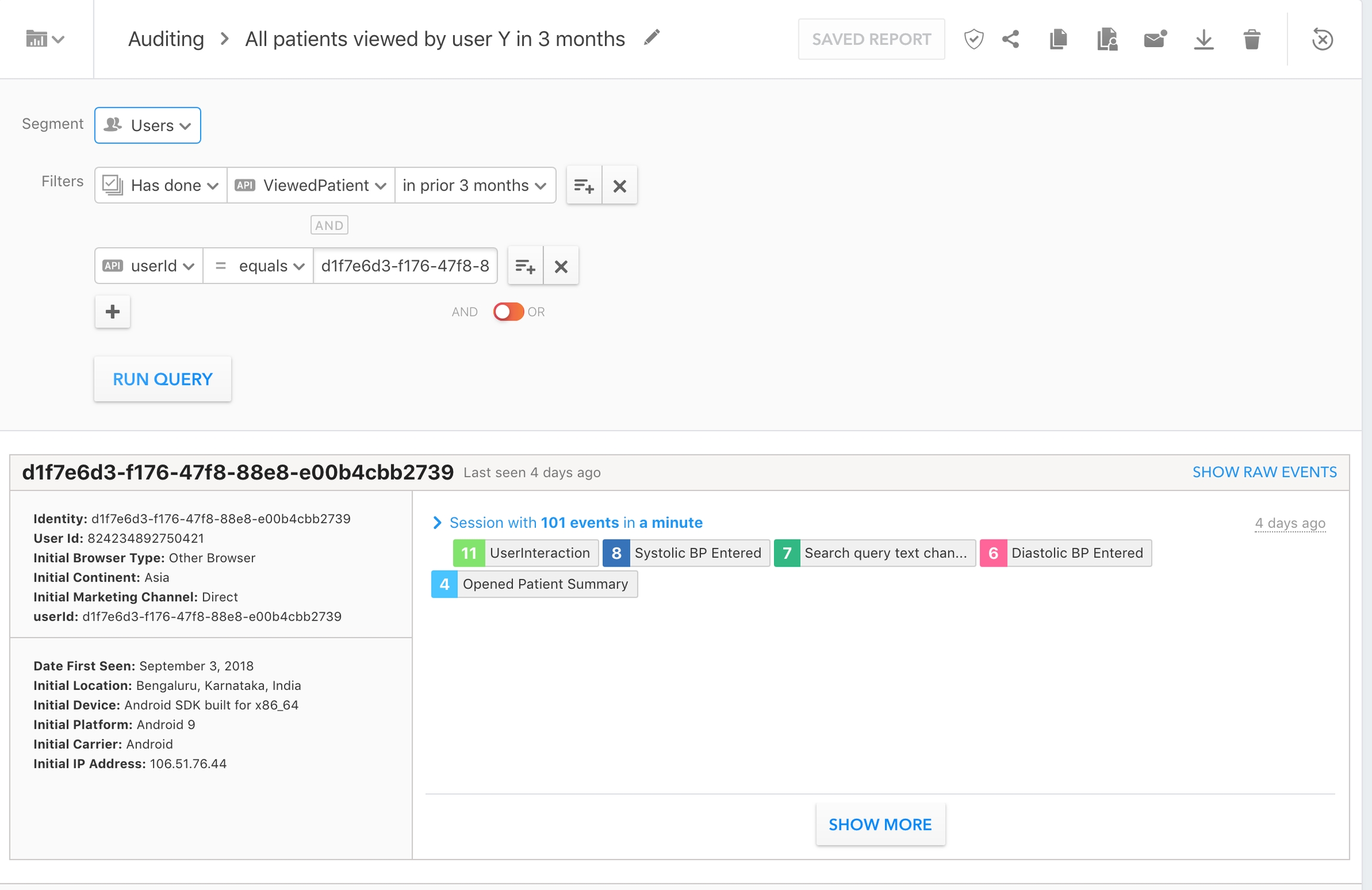

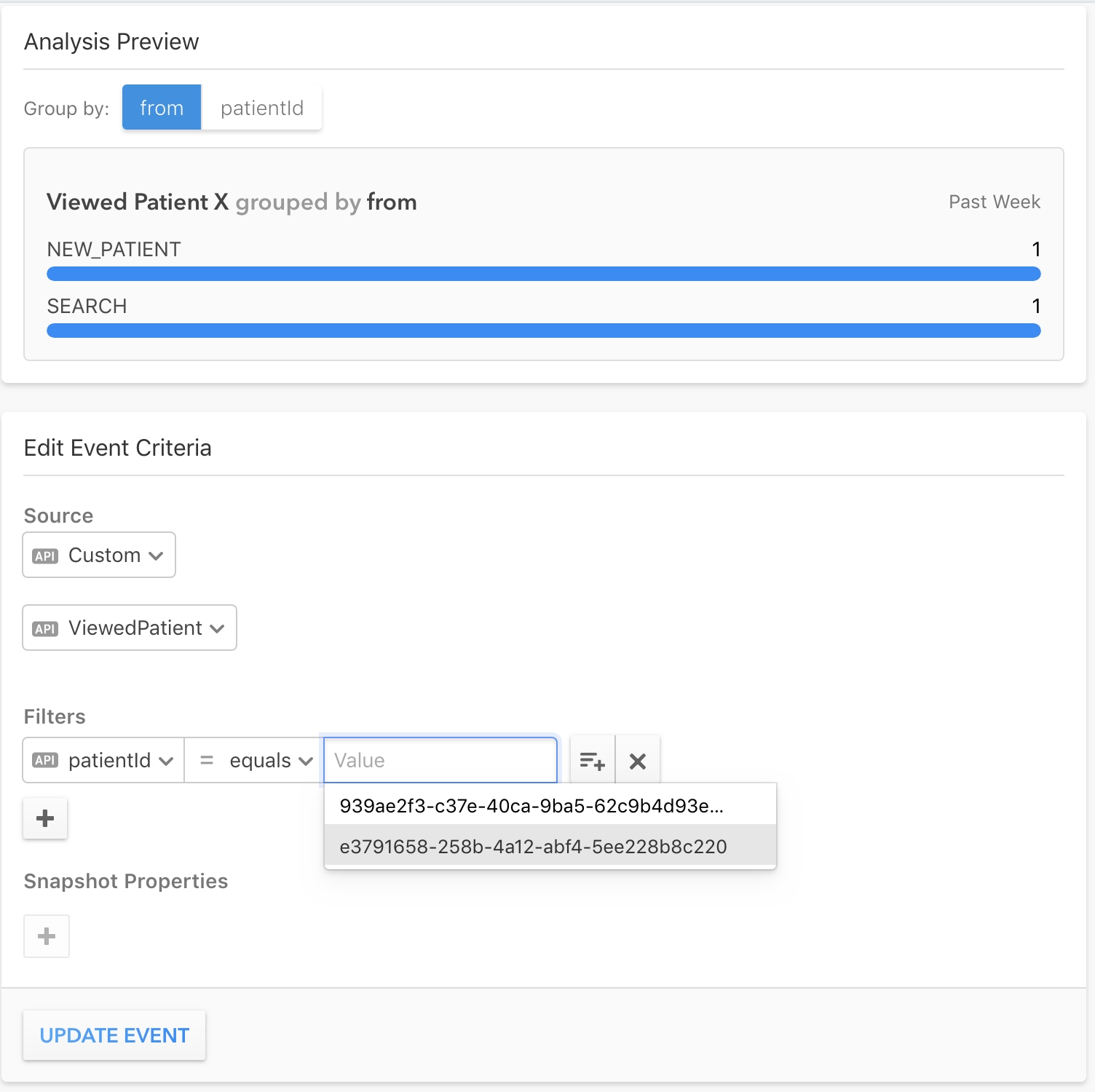
This document lists and defines the key indicators program managers use to track the hypertension and diabetes control programs with Simple.
To improve hypertension and diabetes treatment for a clinic or even an entire population, you have to understand how the system is performing. You need to see if patients are getting healthy, if they’re being treated, if they’re coming back for follow-up visits, and if they’re being registered into the system.
Simple collects the bare minimum of information necessary to identify a patient, treat the patient for hypertension and diabetes, and schedule a follow-up. We aggregate this information generate reports at 5 region levels, from an organization to a facility. Region names are unique for each country:
Monthly registrations: The number of patients registered at a facility during a month where the patient is hypertensive and is not deleted.
Total registrations: The total number of patients registered at a facility. Note: This is calculated by adding monthly registered patients at a facility over time.
Why is this important? Program managers monitor registration numbers to ensure healthcare workers are entering patients into the system.
The number of patients that a facility is responsible for where a patient is hypertensive, not deleted, and not dead.
Why is this important? This indicator is the population base used to calculate indicators like BP controlled and Missed visits.
The number of patients assigned to a facility where the patient is hypertensive, is not deleted, is not dead, and had at least one of the following within the last 12 months: an appointment scheduled, their drugs refilled, a BP taken, or a BS taken.
Why is this important? It represents the number of “active” patients.
The number of patients assigned to a facility where the patient is hypertensive, is not deleted, is not dead, was registered >12 months ago, and hasn’t had at least one of the following within the last 12 months: an appointment scheduled, their drugs refilled, a BP taken, or a BS taken.
Why is this important? The main key indicators exclude lost to follow-up patients to allow program managers to only assess the health of active patients.
Follow-up patients per user: For a given period, the number of patients attended by a user where the patient is hypertensive, is not deleted, was registered before that period, and had at least one of the following during that period: an appointment scheduled, their drugs refilled, a BP taken, or a BS taken.
Follow-up patients per facility: For a given period, the number of patients that visited a facility where the patient is hypertensive, is not deleted, was registered before that period, and had at least one of the following during that period: an appointment scheduled, their drugs refilled, a BP taken, or a BS taken.
Follow-up patients per region: For a given period, the sum of follow-up patients across all facilities in the region.
The number of patients assigned to a facility registered before the last 3 months where the patient is hypertensive, not deleted, not dead, and has a BP measure <140/90 taken within the last 3 months.
Why are patients registered within the last 3 months excluded? Three months gives patients time to take their hypertension medication and to get their BP controlled. Most newly registered patients have uncontrolled blood pressure and including them would not reflect an accurate picture of actual controlled patients.
Why is this important? BP controlled reflects the overall health of a hypertension control program and is the most important indicator our system tracks.
The number of patients assigned to a facility registered before the last 3 months where the patient is hypertensive, not deleted, not dead, and has a BP measure ≥140/90 taken within the last 3 months.
Why is this important? BP not controlled shows which patients are coming back to care, but require continued hypertension treatment to control their blood pressure.
The number of patients assigned to a facility registered before the last 3 months where the patient is hypertensive, not deleted, not dead, and did not have a BP taken but had at least one of the following within the last 3 months: an appointment scheduled, a drug refilled, or a blood sugar taken.
Why is this important? We started tracking this indicator more closely during COVID-19 because patients were visiting facilities to pick up medications but didn’t have their BP taken to avoid contact with healthcare workers and prevent COVID infection. This is not very common, but helps capture the entire patient base.
The number of patients assigned to a facility registered before the last 3 months where the patient is hypertensive, not deleted, not dead, and did not have a visit within the last 3 months.
Why is this important? This number reflects how good facilities are at reminding patients to come back to care in the 3-month period we’re tracking controlled and uncontrolled patients.
Total registered patients divided by the region’s total estimated hypertensive population.
Cohorts allow program managers to track a set of patients receiving treatment over time. We take all the patients registered during a quarter and see the outcome of their visit in the following quarter.
Quarterly cohort reports
BP controlled numerator: The number of patients with a BP <140/90 at their last visit in the quarter after the quarter when they were registered.
BP not controlled numerator: The number of patients with a BP ≥140/90 at their last visit in the quarter after the quarter when they were registered.
Visited but no BP taken numerator: The number of patients with no BP taken but at least one of the following in the quarter after registration: an appointment scheduled, their drugs refilled, or a blood sugar taken.
Monthly registrations: the number of patients registered at a facility during a month where the patient is diabetic and is not deleted.
Total registrations: the total number of patients registered at a facility where the patient is diabetic and is not deleted.
Note: This is calculated by adding monthly registered patients at a facility over time.
The number of patients a facility is responsible for where a patient is diabetic, not deleted, and not dead.
Why is this important? This indicator is the population base used to calculate indicators like BP controlled and Missed visits.
The number of patients assigned to a facility where the patient is diabetic, is not deleted, is not dead, and had at least one of the following within the last 12 months: an appointment scheduled, a their drugs refilled, a BP taken, or a BS taken.
Why is this important? It represents the number of “active” patients.
The number of patients assigned to a facility where the patient is diabetic, is not deleted, is not dead, was registered >12 months ago, and hasn’t had at least one of the following within the last 12 months: an appointment scheduled, their drugs refilled, a BP taken, or a BS taken.
Why is this important? The main key indicators exclude lost to follow-up patients to allow program managers to only assess the health of active patients.
Follow-up patients per user: For a given period, the number of patients attended by a user where the patient is diabetic, is not deleted, was registered before that period, and had at least one of the following during that period: an appointment scheduled, their drugs refilled, a BP taken, or a BS taken.
Follow-up patients per facility: For a given period, the number of patients that visited a facility where the patient is diabetic, is not deleted, was registered before that period, and had at least one of the following during that period: an appointment scheduled, their drugs refilled, a BP taken, or a BS taken.
Follow-up patients per region: For a given period, the sum of follow-up patients across all facilities in the region.
The number of patients assigned to a facility registered before the last 3 months where the patient is diabetic, not deleted, not dead, and has an RBS/PPBS <200, FBS <126, or HbA1c <7.0 within the last 3 months.
Why are patients registered within the last 3 months excluded? Three months gives patients time to take their diabetic medication. Newly registered patients have uncontrolled blood sugar and including them would not reflect an accurate picture of actual controlled patients.
Why is this important? BS <200 reflects the overall health of a diabetes control program and is the most important indicator our system tracks.
The number of patients assigned to a facility registered before the last 3 months where the patient is diabetic, not deleted, not dead, and has an RBS/PPBS 200-299, FBS 126-199, or HbA1c 7.0-8.9 within the last 3 months.
Why is this important? BS 200-299 shows how many patients are coming back to care, but require continued diabetic treatment to control their blood sugar.
The number of patients assigned to a facility registered before the last 3 months where the patient is diabetic, not deleted, not dead, and has an RBS/PPBS ≥300, FBS ≥200, or HbA1c ≥9.0 within the last 3 months.
Why is this important? BS ≥300 shows how many patients are coming back to care, but require continued diabetic treatment to control their high blood sugar.
The number of patients assigned to a facility registered before the last 3 months where the patient is diabetic, not deleted, not dead, and did not have a BS taken but had at least one of the following within the last 3 months: an appointment scheduled, a drug refilled, or a blood pressure taken.
Why is this important? We started tracking this indicator more closely during COVID-19 because patients were visiting facilities to pick up medications but didn’t have their BS taken to avoid contact with healthcare workers and prevent COVID infection. This is not very common, but helps capture the entire patient base.
The number of patients assigned to a facility registered before the last 3 months where the patient is diabetic, not deleted, not dead, and did not have a visit within the last 3 months.
Why is this important? This number reflects how good facilities are at reminding patients to come back to care in the 3-month period we’re tracking controlled and uncontrolled patients.
Total registered patients divided by the region’s total estimated diabetic population. We currently show the patient coverage for “Region 2” and “Region 3” (see region table above for reference). A “Region 2”s patient coverage value is displayed only if all of its child regions have an estimated population value entered on the Dashboard.
The Simple App and Dashboard show lists of overdue patients. A patient is considered overdue if their latest appointment's scheduled date has passed, the appointment is unvisited, and the patient is not dead or marked "already visited".
All overdue patients (and no other patients) are shown in the overdue list and download in the Simple app, as well as the overdue list and download in the Simple Dashboard.
The Simple Dashboard "Overdue patients" list shows all overdue patients, according to .
Why is this important? It’s important for patients to come back to care to continue with their treatment and get their hypertension and diabetes under control. Healthcare workers are crucial at calling patients to remind them to attend their appointments.
How the overdue list is sorted: The overdue list orders patients by the number of days overdue — most recent to oldest.
The Simple App "Overdue patients" list shows all overdue patients, according to . Once a patient has a visit to any health facility, they are removed from the Overdue patients list.
Patients are sorted into categories:
PENDING TO CALL
Overdue patients who have not been called already (i.e. a user has not yet marked a "Result of call" after contacting the patient). Patients with no visit in >1 year are excluded.
AGREED TO VISIT
Overdue patients who have been marked as "Agreed to visit" in the past. The date when this status was changed is shown in the app when you tap on the phone icon.
All patients called during a month by healthcare workers in a facility or region. These patients appear in the “Overdue” tab in the Simple App and Dashboard. A patient is marked as “contacted” whenever a healthcare worker or Dashboard admin marks an overdue patient with one of the following results on the Simple App: (1) Agreed to visit (2) Remind to call later (3) Remove from the overdue list.
Why is this important? It’s helpful for program managers to know how much calling activity is happening at facilities.
Facilities registered in Simple where the current user can view reports and where <10 patients had a BP recorded in the last 7 days.
How is it calculated? First we calculate total active facilities (facilities where >10 patients had any BPs recorded in the last 7 days). Then we grab all facilities the admin has access to, count the total number of patients with a BP taken in a day for the last 7 days at each facility, and return the number of facilities where the facility has had more than 10 patients with a BP taken in the last week.
Why is this important? It allows program managers to see which facilities may be facing technical issues with the system or healthcare workers that are forgetting to record BP measures into the system.
Counts all BPs recorded by each healthcare worker at a facility where the patient is hypertensive and not deleted.
Why is this important? Similar to inactive facilities, it allows program managers to see which facilities are facing technical issues or facilities with healthcare workers that aren’t recording BP measures into the system.
All blood pressures recorded at a facility.
Why is this important? This allows program managers to see if healthcare workers are inputting accurate BP readings into the system. It’s common for healthcare workers to round systolic and diastolic numbers or to enter BPs that are just one point below the threshold (e.g. 139/89).
Why is this important? This indicator is used to monitor the facility’s activity. Follow-up patients per facility are often compared with total assigned patients because they show what proportion of patients are coming back to care.
Missed visits numerator: The number of patients with no visit in the quarter after the quarter when they were registered.
Denominator: The number of patients assigned to a facility where the patient is hypertensive, is not deleted, is not dead, and was registered during a quarter.
Why is this important? This indicator is used to monitor the facility’s activity. Follow-up patients per facility are often compared with total assigned patients because they show what proportion of patients are coming back to care.
REMIND TO CALL LATER
Overdue patients who have been marked as "Remind to call later" in the past. The date when this status was changed is shown in the app when you tap on the phone icon. REMOVED FROM LIST
Overdue patients who have been marked as "Removed from overdue list" in the past. Reasons can be "Patient is not responding", "Phone number does not work", "Transferred to another public health facility", "Moved to private practicioner", or "Other reason". If a patient is marked as "Patient has already visited" or "Died", they are no longer shown in the overdue list and are not counted.
NO VISIT IN 1 YEAR
All overdue patients who have not visited in >1 year are excluded from other sections and are filed in this section. Dead patients are excluded.
Country
Region 1
Region 2
Region 3
Region 4
Region 5
🇮🇳 India
Organization
State
District
Block
Facility
🇧🇩 Bangladesh
Organization
Division
District
Upazila
Facility
🇪🇹 Ethiopia
Organization
Region
Zone
Woreda
Facility
🇱🇰 Sri Lanka
Organization
Province
District
Town
Facility